Every company operating in Brazil eventually needs to verify its customers' identities. The CPF — Cadastro de Pessoa Física, Brazil's individual taxpayer ID — is the key document for that. But there's a world of difference between looking up CPFs manually, one by one, on the Receita Federal (Brazil's federal tax authority) website, and automating that process via API inside your own system.
In this article, we'll explain exactly how each approach works, why manual lookups don't scale, and how to integrate a CPF lookup API to automate verifications reliably. If you're a developer, CTO or lead a technical team that needs to implement KYC, onboarding or fraud prevention, this guide is for you.
What a CPF lookup at the Receita Federal is
The CPF is issued and maintained by the Receita Federal do Brasil (RFB). Each number is tied to registration data such as full name, date of birth and registration status — which can be Regular, Pending Regularization, Suspended, Canceled, Null or Holder Deceased.
The Receita offers a public lookup at servicos.receita.fazenda.gov.br. The process is simple: you enter the CPF number and the holder's date of birth, solve a captcha, and receive a registration status certificate.
That lookup is free and works well for one-off checks — verifying your own CPF's status before filing your income tax return, for example. But when the need is business-critical and recurring, the problems show up fast.
Why manual lookups don't scale
In practice, anyone who tries to use the Receita Federal's manual lookup as part of a business process runs into structural limitations.
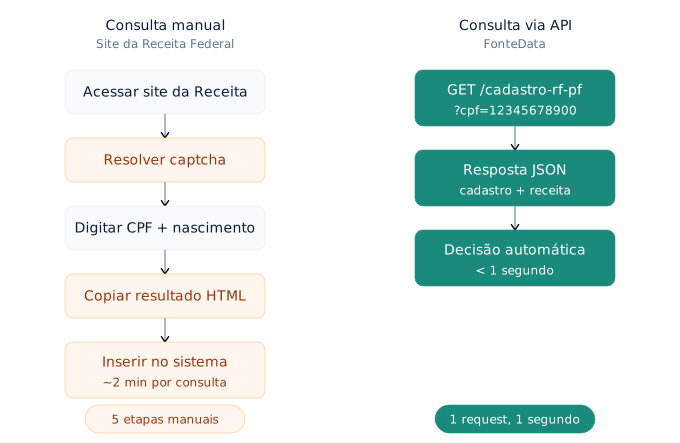
Mandatory captcha. Every lookup requires solving a captcha. That blocks any kind of direct automation and forces human intervention on every single check.
One lookup at a time. There is no batch feature. If you need to validate 200 CPFs from new signups in a day, that's 200 manual visits to the site, 200 captchas and 200 copy-pasted results.
No system integration. The result is an HTML page — a visual certificate. There is no structured output (JSON, XML) your system can process automatically to decide whether to approve or reject a signup.
No guaranteed availability. The Receita's website has no SLA for external use. It can be down, slow or returning errors at peak hours with zero predictability.
No logging or traceability. When an analyst runs a manual lookup, there is no standardized record. In an audit or dispute, reconstructing the verification history is laborious and error-prone.
For any operation that needs to validate more than a handful of CPFs per day — customer onboarding, credit analysis, invoice issuance or fraud prevention — manual lookup is an operational bottleneck.
What a CPF lookup via API is
A CPF lookup API performs, in essence, the same verification as the manual lookup, but programmatically. Your system sends an HTTP request with the CPF number and receives, in milliseconds, a structured response with the registration data and the document's status.
The fundamental difference is that the entire process happens machine-to-machine, with no human intervention, no captcha and no copy-pasting data between screens.
A typical call works like this:
curl -H "X-API-Key: SUA_CHAVE" \
  "https://app.fontedata.com/api/v1/consulta/cadastro-rf-pf?cpf=12345678900"
And the response arrives as JSON, with two main blocks — cadastro (enriched data) and receita (official Receita Federal data):
{
  "cadastro": {
    "cpf": "123.456.789-00",
    "nome": "Maria Silva Santos",
    "sexo": "Feminino",
    "dataNascimento": "15/06/1990 00:00:00",
    "nomeMae": "Ana Santos Lima",
    "idade": 35,
    "telefones": [
      {
        "telefoneComDDD": "11999887766",
        "operadora": "VIVO",
        "tipoTelefone": "CELULAR",
        "whatsApp": true
      }
    ],
    "enderecos": [
      {
        "logradouro": "R EXAMPLE",
        "numero": "100",
        "complemento": "AP 42",
        "bairro": "CENTRO",
        "cidade": "SAO PAULO",
        "uf": "SP",
        "cep": "01001-000"
      }
    ],
    "rendaEstimada": "8500.00",
    "rendaFaixaSalarial": "Faixa 5 a 8 salários mínimos"
  },
  "receita": {
    "numeroCPF": "123.456.789-00",
    "nomePessoaFisica": "MARIA SILVA SANTOS",
    "nomeSocial": null,
    "dataNascimento": "15/06/1990 00:00:00",
    "situacaoCadastral": "REGULAR",
    "dataInscricao": "10/03/2005 00:00:00",
    "digitoVerificador": "00",
    "dataEmissao": "06/01/2026 10:15:32",
    "codigoControleComprovante": "A1B2.C3D4.E5F6.G7H8",
    "possuiObito": false,
    "anoObito": null
  }
}
The receita block carries the official Receita Federal data — registration status, registration date, and a certificate with a control code. The cadastro block enriches it with phone numbers, addresses, estimated income and other data useful for KYC. With that structured response, your system can make decisions automatically: approve the signup if the status is Regular, block it if it's Suspended or Canceled, or route it to human review if the name doesn't match.
Check-digit validation vs. official lookup: don't confuse the two
A common mistake is thinking that validating a CPF just means checking whether the check digits are correct. The mod-11 algorithm — the math that verifies whether the CPF's last two digits are consistent — exists to catch typos. It answers the question "is this number mathematically possible?"
But it doesn't answer whether the CPF actually exists, whether it's active, whether it belongs to the person who provided it, or what the current registration status is. Fraudsters generate mod-11-valid CPFs at scale — the algorithm is public and trivial to implement.
The API lookup solves the second problem: it goes to the official source and confirms existence and status. In a good validation architecture, the two steps work together.
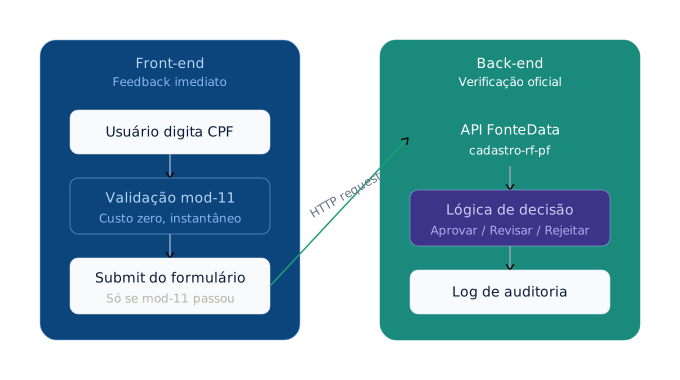
On the front end, use check-digit validation to give the user instant feedback and catch obvious typos, with no cost and no latency. On the back end, use the API lookup to confirm against the official source before releasing any sensitive action like account creation, credit approval or wallet activation.
Use cases: where a CPF lookup API is indispensable
CPF validation via API isn't a technical luxury — it's an operational necessity in a wide range of scenarios.
Onboarding and KYC (Know Your Customer). Fintechs, digital banks, crypto exchanges and payment platforms need to verify every customer's identity before enabling financial operations. The CPF lookup is the first layer of that process. If the CPF is invalid, nonexistent or irregular, there's no point advancing to more expensive steps like biometric verification or credit analysis.
Fraud prevention in e-commerce. Validating the CPF at checkout significantly reduces fake accounts and chargebacks. A CPF with a Canceled or Null status being used for a purchase is a clear signal of attempted fraud.
Invoice issuance. To issue an NF-e (Brazil's electronic invoice), the recipient's CPF must be correct and active. Checking before issuing avoids rejection by SEFAZ (the state tax authority) and rework for the tax team.
Driver and contractor registration. Mobility platforms and service marketplaces need to validate partners' identities before activating them. The CPF lookup is the first step to confirm the person exists and is in good standing.
Credit analysis. Before running a score or querying bureaus (Serasa, Boa Vista), it makes sense to check whether the CPF is in good standing. If the registration status is already disqualifying, the credit pipeline can stop before incurring the cost of more expensive queries.
Regulatory compliance. Companies in regulated sectors — finance, healthcare, insurance — need to demonstrate in audits that they verified their customers' identities. The API lookup produces structured logs that serve as evidence.
How to integrate: a hands-on example with the FonteData API
FonteData aggregates more than 100 data sources into a unified API. That means with a single integration you can look up CPF, CNPJ (Brazilian company registration number), KYC and many other databases — without maintaining multiple contracts and integrations with different vendors.
1. Create your account and get an API key
Go to fontedata.com and create your account in under 30 seconds. You get R$50 in free credits to test, with no credit card. Your API key is available immediately in the dashboard.
2. Make your first request
With the API key in hand, a lookup is a single request:
cURL:
curl -H "X-API-Key: fd_live_sua_chave_aqui" \
  "https://app.fontedata.com/api/v1/consulta/cadastro-rf-pf?cpf=12345678900"
Python:
import requests

response = requests.get(
    "https://app.fontedata.com/api/v1/consulta/cadastro-rf-pf",
    params={"cpf": "12345678900"},
    headers={"X-API-Key": "fd_live_sua_chave_aqui"}
)

dados = response.json()
receita = dados["receita"]

if receita["situacaoCadastral"] == "REGULAR":
    print(f"CPF válido — titular: {receita['nomePessoaFisica']}")
else:
    print(f"CPF com situação: {receita['situacaoCadastral']}")
Node.js:
const response = await fetch(
  "https://app.fontedata.com/api/v1/consulta/cadastro-rf-pf?cpf=12345678900",
  {
    headers: { "X-API-Key": "fd_live_sua_chave_aqui" }
  }
);

const dados = await response.json();
const receita = dados.receita;

if (receita.situacaoCadastral === "REGULAR") {
  console.log(`CPF válido — titular: ${receita.nomePessoaFisica}`);
} else {
  console.log(`CPF com situação: ${receita.situacaoCadastral}`);
}
3. Implement the decision logic
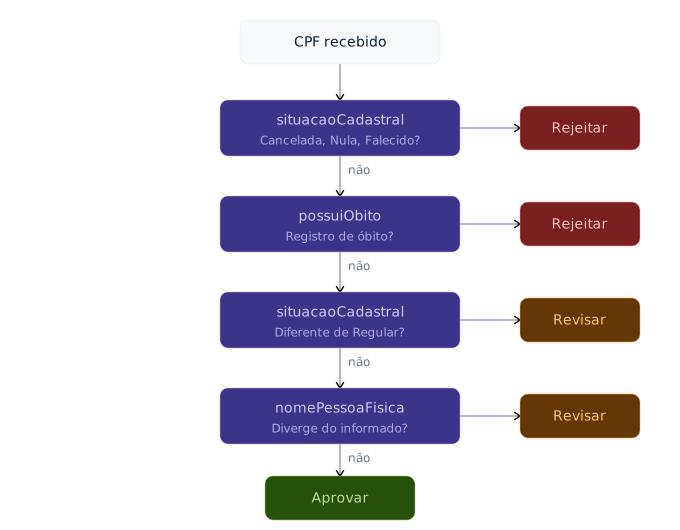
The real power shows up when you connect the API response to your business flow. An efficient pattern for onboarding works like this:
def validar_cpf_onboarding(cpf: str, nome_informado: str) -> dict:
    """
    Validates a CPF in the onboarding flow.
    Returns a decision: approve, review or reject.
    """
    response = requests.get(
        "https://app.fontedata.com/api/v1/consulta/cadastro-rf-pf",
        params={"cpf": cpf},
        headers={"X-API-Key": API_KEY}
    )
    dados = response.json()
    receita = dados["receita"]

    # Disqualifying status → automatic rejection
    situacoes_bloqueio = ["CANCELADA", "NULA", "TITULAR FALECIDO"]
    if receita["situacaoCadastral"] in situacoes_bloqueio:
        return {
            "decisao": "REJEITAR",
            "motivo": f"CPF com situação {receita['situacaoCadastral']}"
        }

    # Death record on file → automatic rejection
    if receita.get("possuiObito"):
        return {
            "decisao": "REJEITAR",
            "motivo": "CPF com registro de óbito"
        }

    # Pending status → human review
    if receita["situacaoCadastral"] != "REGULAR":
        return {
            "decisao": "REVISAR",
            "motivo": f"CPF com situação {receita['situacaoCadastral']}"
        }

    # Name mismatch → human review
    nome_oficial = receita["nomePessoaFisica"].upper().strip()
    if nome_informado.upper().strip() != nome_oficial:
        return {
            "decisao": "REVISAR",
            "motivo": "Nome informado diverge do cadastro oficial"
        }

    # All clear → automatic approval
    return {"decisao": "APROVAR", "motivo": None}
This is a simplified example. In production, you can add fuzzy name matching (to handle abbreviations and accents), minimum-age validation using the dataNascimento field from the cadastro block, and cross-referencing of phone numbers and addresses to enrich a confidence score.
Architecture best practices
Integrating a CPF API is simple. Integrating it well requires attention to a few points.
Validate on the front end, look up on the back end. The check digits (mod-11) can be verified on the front end for instant feedback. The official lookup should happen on the back end, where you control the decision logic and protect your API key.
Don't query on every keystroke. Call the API only when the user confirms their data — on form submit, not while they type. That cuts cost and avoids unnecessary lookups.
Cache deliberately. CPF registration data doesn't change often. Depending on your use case, a 24-hour or even 7-day cache may be appropriate to reduce repeated calls without compromising reliability. For high-value financial operations, always look up in real time.
Handle errors gracefully. The API may be temporarily unavailable. Your system needs a defined fallback: queue for retry, allow with provisional restrictions, or block and notify. Never swallow the error and silently approve.
Keep structured logs. Record every lookup with timestamp, the CPF queried (masked if necessary), the result and the decision made. In an audit, that log is your evidence of due diligence.
Manual lookup vs. API: side-by-side summary
| Aspect | Manual lookup (Receita) | Lookup via API |
|---|---|---|
| Speed | 30s–2min per lookup | < 1 second |
| Captcha | Mandatory | None |
| Response format | Visual HTML | Structured JSON |
| System integration | None | Direct via HTTP |
| Volume | One at a time | Thousands per minute |
| Operational cost | Analyst time | Cents per lookup |
| Traceability | Manual | Automatic logs |
| Availability | No SLA | Contractual SLA |
What about the LGPD?
CPF lookups via API work with public data available from the Receita Federal. Even so, the LGPD (Brazil's data protection law) requires that any processing of personal data have a legal basis and a defined purpose. In practice, that means you need a legitimate justification for each lookup — KYC, fraud prevention, a legal obligation or performance of a contract are all adequate bases. You should not look up CPFs indiscriminately, with no connection to a concrete operation.
FonteData operates in compliance with Brazilian law and does not store personal data of the individuals queried beyond what is needed for the operation log.
Next step
If you need to validate CPFs in your system — for onboarding, fraud prevention, invoicing or compliance — the most efficient way is to integrate via API.
FonteData offers CPF lookups as part of a hub with more than 100 data sources, including CNPJ, KYC, Receita Federal, fraud prevention and much more. You pay per lookup, with no monthly fee, and R$50 in free credits to get started.
Need help with the integration? Our documentation covers every endpoint with examples in Python, Node.js, cURL and more. Go to the documentation →
Try the FonteData API
Query Brazilian company and individual data via API — CNPJ, CPF, KYC, compliance and more. R$50 in free credits to test.
Create free account →